HOW REELUSE WORKS
From your first video
to your first post.
What to add, what ReelUse does, and what you can change before you share.
01 / SET UP YOUR VIDEO
Choose your
starting point.
Paste a supported video link in your browser, or choose a file in the Mac or Windows app.
Use a finished livestream replay if that’s what you have. The original file is useful when the link is private, unavailable or lower quality.
Get the desktop appAlready online? Start here.
Copy the link to your video or finished livestream.
Workflow illustration
A whole service?
Keep just the talk.
Set a start and end time. ReelUse only looks for clips inside that window.
Illustrated example. One talk covers up to 60 minutes of the section selected.
One talk,
a different look.
Pick a caption style, font, colour grade, music and outro for a single talk from the Look chip, with a live preview. Your saved branding is left alone, and the talk's card shows what it was made with.
Teams keep named Looks, one per campus or one per service, and each person sets the one their runs use. See how Looks work
Reduce the
background noise.
Choose Reduce background noise on the Audio chip before you start. Speech is cleaned up, while your music and outro are left as they are, and the choice is remembered for the talks that follow.
Have something
specific in mind?
Open Moments and describe a story or topic you want ReelUse to look for.
Matching clips move up the ranking. Other strong moments can still appear, and your request isn’t a guarantee.
See how trim and Moments work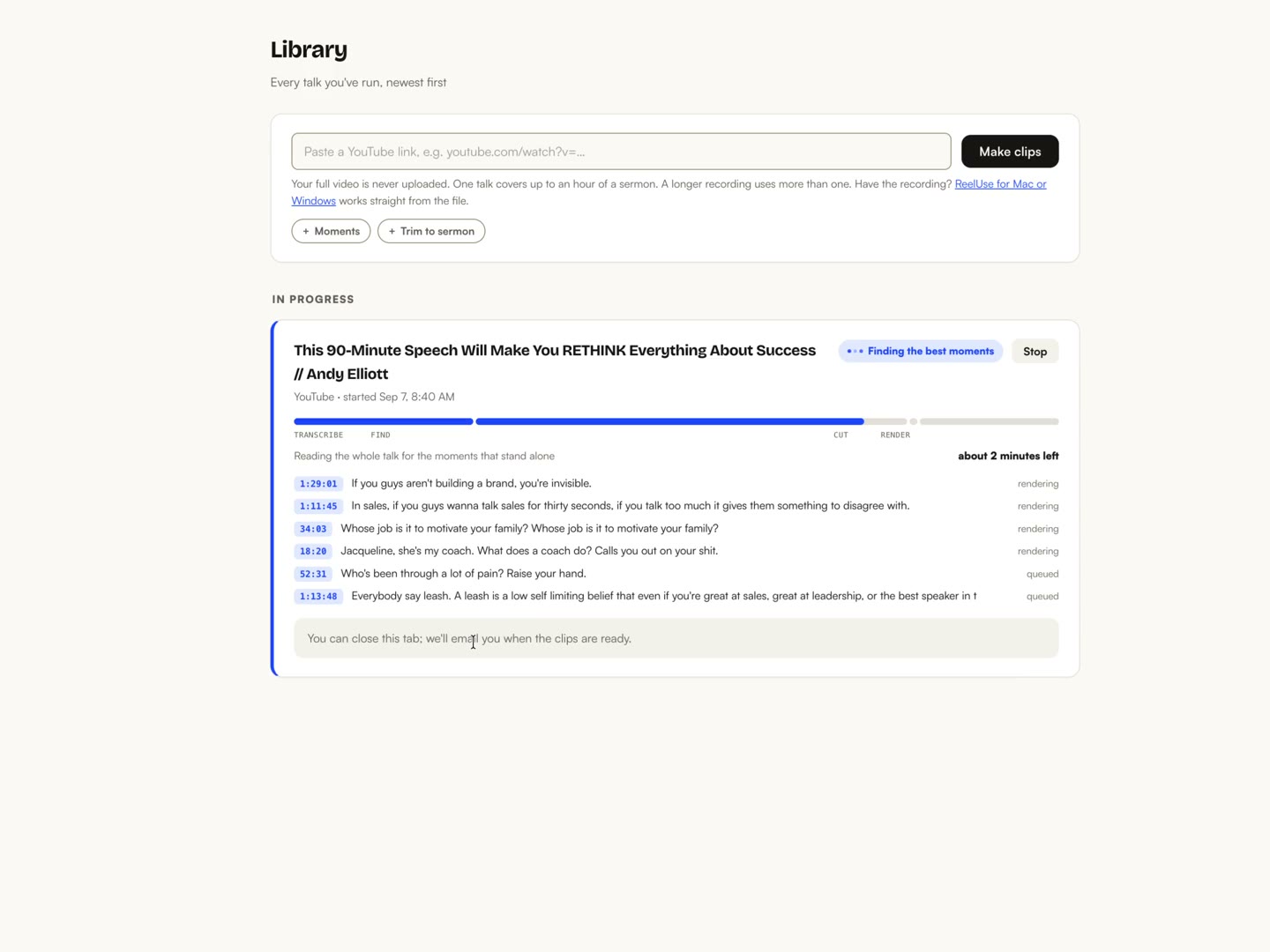
02 / GET YOUR CLIPS
Your results,
in one place.
ReelUse selects candidate moments, reframes them vertically and adds captions. Finished clips appear in your library, strongest first.
Expect 5–10 clips from a full-length recording, with the first clips usually ready in 10–15 minutes. You can review them while the rest finish. Results and timing vary with the recording.
03 / MAKE CORRECTIONS
A name misheard?
Fix that word.
Open a clip’s ··· menu and choose Edit captions. Correct the text, then choose Save & re-render.
A name in the recording
Try changing “Sara” to “Sarah”.
This example only changes the words shown here.
Tell us the words you use.
Add names and terms to Words we say under Branding on Growth and Pro. Review the captions even with your list saved.
A small step is still a start
You don’t have to have the whole plan. Take the next step.
Sample text to demonstrate the post kit, not a quote from the video.
04 / GET READY TO POST
The clip.
And words to go with it.
Download your chosen clip as an MP4. Its captions and applied branding are already in the video.
Open its post kit for suggested titles and post captions. Copy a draft, make it sound like you, and post it with your clip.
The post kit is separate from the spoken words in your video. ReelUse doesn’t publish to your social accounts.
SEE THE WHOLE JOURNEY
From the link
to the library.
Your real workflow, condensed to 40 seconds.
Waiting time removed. Silent walkthrough.
Start with your own video when you’re ready. Try ReelUse free
Do I need editing experience?+
No. ReelUse handles the first selection, vertical framing and captions. You review the results and correct anything that needs your attention.
Can I use a whole service or a long episode?+
Yes. If you only want part of a recording, set where the talk starts and ends. This keeps introductions, music or announcements out of the section you want clipped. A talk covers up to 60 minutes; longer recordings use more of your allowance.
How many clips will I get, and how long does it take?+
Expect 5–10 clips from a full-length recording. The first clips are usually ready in 10–15 minutes, with the rest appearing as they finish. A shorter recording may produce fewer clips, and longer recordings or busy periods can take more time.
How long can I keep and edit the clips?+
Storage depends on your plan. Download the clips you want to keep. Caption rebuilding also depends on the source material still being available within its storage window. Check your plan’s storage allowance
Can I add my own branding?+
Starter includes caption styles and colours and removes the ReelUse watermark. Growth and Pro add the full brand kit, including logo, outro and music. Set this up before making your next clips.
Does my full recording leave my computer?+
When you use the desktop app, the full recording stays on your computer. Audio is sent for transcription and finished clips are uploaded to your library. If local rendering is unavailable, the selected short video segments are processed in the cloud. Read the privacy details
Does it work in my language?+
ReelUse supports more than 25 languages, with captions in the language spoken. Yoruba, Igbo, Hausa, Swahili, Zulu and Amharic are not currently supported. Check your language with us
What can I try for free?+
One video up to 60 minutes each month, with no card required. Free clips carry the ReelUse mark. You can review and download them before deciding whether to upgrade.
YOU ALREADY HAVE THE STARTING POINT
Ready for your
first recording?
Make my first clips free One video up to 60 minutes free each month. No card required.